

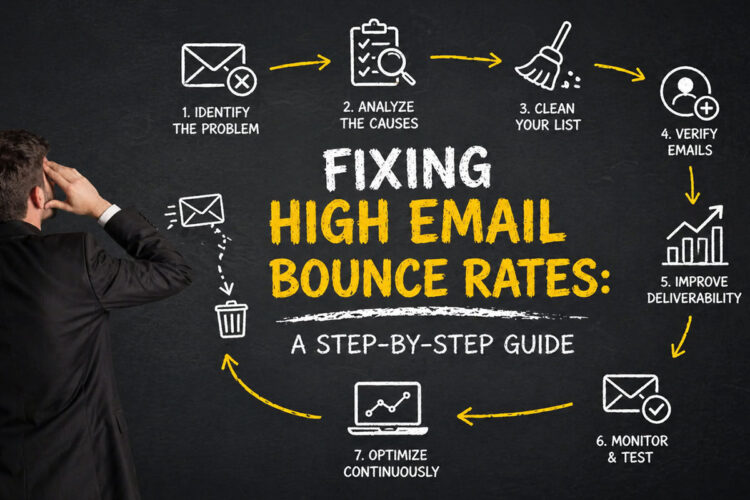
You’re staring at your email marketing analytics, and a cold dread creeps in. That number, the one labeled “Bounce Rate,” is higher than you’d like. Way higher. It’s not just a metric; it’s a flashing red alert that your messages aren’t reaching their intended destination, wasting precious marketing resources and damaging your sender reputation.
Don’t panic. This isn’t an insurmountable problem. A high bounce rate is a common issue for many businesses, but it’s one you can absolutely tackle with a systematic approach. This guide will walk you through the process, step-by-step, empowering you to reclaim your inbox deliverability and ensure your messages land where they’re meant to. We’ll delve into the reasons behind bounces, how to identify them, and most importantly, how to fix them.
Before you can fix the problem, you need to understand the enemy. Email bounces aren’t a monolithic entity; they’re categorized, and each category points to a different root cause. Ignoring these distinctions is like trying to fix a leaky pipe without knowing if it’s a burst main or a loose faucet.
The Two Pillars: Hard Bounces and Soft Bounces
The first crucial step in diagnosing your bounce rate issue is to differentiate between the two primary types of bounces. Your email service provider (ESP) will typically categorize these for you, but knowing what they mean is essential for effective troubleshooting.
Hard Bounces: The Permanent Roadblocks
Hard bounces are the more serious of the two. They signify a permanent delivery failure. When an email hard bounces, it means the recipient’s email address is invalid, non-existent, or has been permanently blocked by the receiving server.
- Invalid Email Addresses: This is perhaps the most common reason for a hard bounce. It could be a simple typo (e.g.,
gamil.cominstead ofgmail.com), a forgotten letter, or an entirely made-up address that was never created. - Non-Existent Domains: The domain part of the email address (e.g.,
@example.com) might not exist. This can happen if a business closes down and its domain is no longer registered, or if an invalid domain was entered during signup. - Recipient Server Rejection: In some cases, the receiving mail server might permanently reject your emails due to their policies or blacklisting of your sending IP address or domain. This is often a sign of more significant sender reputation issues.
- Spam Traps: Unwittingly sending to a spam trap email address will almost certainly result in a hard bounce. Spam traps are often honeypots set up by ISPs to catch spammers. They are typically unmonitored, legitimate-looking addresses that are never supposed to receive unsolicited mail.
Soft Bounces: The Temporary Hurdles
Soft bounces, on the other hand, indicate a temporary delivery issue. The email address is likely valid, but something is preventing it from being delivered at that moment. For these, re-sending the email at a later time might be successful.
- Full Mailbox: The recipient’s inbox is full and cannot accept any more messages. Think of it like a physical mailbox that’s overflowing.
- Server Overload or Unavailable: The receiving mail server is experiencing heavy traffic, is temporarily down for maintenance, or is otherwise inaccessible.
- Message Too Large: The email, including attachments, exceeds the size limit set by the receiving server.
- Content Filtering: While not strictly a bounce, some emails might be blocked by aggressive spam filters on the recipient’s end, appearing similar to a soft bounce if the sender isn’t notified directly. This often falls into a grey area, but it impacts deliverability nonetheless.
Understanding these distinctions is paramount. A high hard bounce rate points to issues with your list quality and acquisition processes, while a consistently high soft bounce rate might indicate problems with your sending frequency, email content, or server performance.
The Root Causes: Why Your Emails Are Bouncing Back
Now that you understand the types of bounces, let’s dig into the common culprits that lead to them. Identifying these underlying problems is the essential groundwork for developing effective solutions.
List Inaccuracies and Data Decay
Your email list is your most valuable asset, but if it’s not maintained, it becomes a liability. Over time, email addresses become outdated, leading to a steady increase in bounces. This is known as data decay.
Inaccurate Data Collection
The way you acquire email addresses significantly impacts their validity. If your signup forms are prone to errors or you’re not validating information at the point of collection, you’re inviting bounces from day one.
- Typos in Signup Forms: This is a constant battle. Even the most careful user can make a mistake. Not having a double opt-in process exacerbates this.
- Purchased or Rented Lists: This is a cardinal sin of email marketing. These lists are notorious for their high bounce rates, inaccurate information, and poor engagement, not to mention the severe damage they inflict on your sender reputation. You’re essentially sending to a graveyard of outdated or fake addresses.
- Third-Party Data Sharing: If you obtain email addresses through partnerships or through means where consent wasn’t explicitly given to you directly, the likelihood of these addresses being invalid or the recipient not expecting your emails is significantly higher.
The Inevitable March of Data Decay
People change email addresses for various reasons: they switch jobs, switch ISPs, or simply prefer to use a different address. This constant flux means your list will naturally accumulate invalid addresses over time if not actively managed.
- Job Changes: Employees often lose access to their company email addresses when they leave a role. If your list contains business emails, this is a significant factor.
- ISP Changes: Individuals may switch internet service providers and, with them, their associated email addresses.
- Deactivated Accounts: Over time, dormant email accounts are often closed by providers.
Sender Reputation Woes
Your sender reputation is your digital footprint in the eyes of Internet Service Providers (ISPs) and mailbox providers (like Gmail, Outlook, Yahoo). A poor reputation is a direct path to high bounce rates, as these providers will start rejecting your emails before they even reach the intended recipients.
Aggressive Sending Practices
Sending too many emails too quickly can flag you as a potential spammer. ISPs monitor sending patterns and volume as key indicators of legitimate sending behavior.
- Sudden Spikes in Sending Volume: If you go from sending a few hundred emails a day to tens of thousands overnight, without a gradual build-up of a warm IP, this is a major red flag for ISPs.
- High Sending Frequency to Unengaged Recipients: Bombarding people who haven’t interacted with your emails for a long time, or who never confirmed their subscription, will lead to them marking your emails as spam, which directly impacts your sender reputation.
- Lack of Engagement Metrics: Ignoring metrics like open rates and click-through rates can be detrimental. Low engagement signals to ISPs that your content isn’t valuable to your subscribers, making them more likely to filter your emails.
Inconsistent Authentication and Technical Issues
Proper setup of your email sending infrastructure is critical. Any misconfiguration can be interpreted as malicious activity, damaging your reputation.
- Lack of SPF, DKIM, and DMARC Records: These are fundamental email authentication protocols. Without them, ISPs have no way to verify that you are who you say you are, making it easier for spammers to impersonate you. This makes your legitimate emails suspect.
- IP Address Blacklisting: If your sending IP address has been flagged for sending spam (even if it was unintentional), it can be added to blacklists. This means most major ISPs will automatically reject emails from that IP.
- Domain Reputation Problems: Similar to IP reputation, your domain can also develop a bad reputation if it’s associated with spammy activity.
Content and Engagement Issues
The content of your emails and the engagement (or lack thereof) of your subscribers play a significant role in bounce rates, particularly soft bounces, and indirectly, hard bounces through spam complaints.
Spammy Content
Even if your list is clean and your reputation is good, certain content can trigger spam filters, leading to your emails being blocked or marked as spam.
- Overuse of Spam Trigger Words: Words like “free,” “guarantee,” “discount,” “deal,” and excessive use of exclamation points or all caps can make your email look suspicious.
- Misleading Subject Lines: Subject lines that don’t accurately reflect the email’s content can lead to subscribers marking your email as spam when they open it.
- Excessive Links and Attachments: A high density of links, especially to untrusted sources, or large attachments can alarm spam filters.
Low Subscriber Engagement
This is a critical indicator for ISPs. If subscribers aren’t opening, clicking, or interacting with your emails, ISPs will eventually start treating your emails as unwanted.
- Stale and Unresponsive Subscribers: Subscribers who haven’t opened an email in months or years are unlikely to engage. They might be inactive accounts, have forgotten about you, or simply aren’t interested anymore. Sending to them increases your bounce rate and significantly harms your sender reputation.
- Sending Irrelevant Content: If your email campaigns aren’t tailored to the interests of your subscribers, they’re less likely to engage. This leads to low open rates and higher chances of being marked as spam.
Your Step-by-Step Action Plan to Reduce Bounce Rates
Now that you’ve diagnosed the likely causes, it’s time to roll up your sleeves and implement solutions. This is where you’ll see the tangible improvements in your email deliverability.
Step 1: Clean Your Email List Regularly and Systematically
This is the most impactful step you can take. A clean list is the foundation of good deliverability. You need to be proactive about removing invalid and unengaged addresses.
Implementing a Rigorous Validation Process
- Real-time Email Verification: As subscribers sign up, use an email verification service to check new addresses for validity. This catches typos and nonexistent domains at the point of entry. Many ESPs offer integrations for this.
- Segmentation Based on Engagement: Divide your list into segments based on how recently subscribers have opened or clicked your emails.
- Highly Engaged: Open and click regularly.
- Moderately Engaged: Open occasionally.
- Lapsed/Inactive: Haven’t opened or clicked in a significant period (e.g., 3-6 months).
- Regularly Prune Inactive Subscribers: This is crucial. If a subscriber hasn’t engaged with your emails for a defined period (e.g., 6 months), they are a liability.
- Launch Re-engagement Campaigns: Before outright deleting, try a re-engagement campaign. Send a series of emails with compelling offers or content, asking if they still want to hear from you. Make it easy to update preferences or unsubscribe.
- Automated Removal of Unresponsive Subscribers: After your re-engagement efforts, automatically remove those who still don’t respond. This might feel drastic, but it’s essential for long-term deliverability.
Handling Hard Bounces Immediately
- Automatic Removal of Hard Bounces: Your ESP should automatically flag and remove hard-bounced addresses. If yours doesn’t, set this up as a manual process. Never attempt to re-send to a hard-bounced address.
- Investigate Trends: If you see a sudden spike in hard bounces from a particular domain or signup source, investigate why. It could indicate a issue with a specific signup form or a problem with a partner.
Step 2: Optimize Your Acquisition Strategy for Quality
The quality of your leads is more important than the quantity. Focus on obtaining accurate emails from genuinely interested individuals.
Leveraging Double Opt-In
This is a non-negotiable best practice for building a healthy email list.
- What is Double Opt-In? When a user signs up for your list, they receive an email asking them to confirm their subscription by clicking a link.
- Benefits for Bounce Rates:
- Confirms Email Validity: The recipient must have a working email address to receive and click the confirmation link.
- Guarantees Intent: It ensures the user genuinely wants to subscribe, reducing the chance of them marking your emails as spam later.
- Reduces Typos: Users are more careful when confirming.
- Implementation: Most ESPs offer easy ways to set up double opt-in. Make your confirmation email clear and compelling.
Improving Signup Form Practices
- Clear and Transparent Messaging: Clearly state what subscribers will receive and how often.
- Minimize Required Fields: Only ask for essential information. Too many fields can deter signups and increase errors.
- Implement Input Masking and Validation: For fields like email addresses, use JavaScript to validate the format in real-time, catching simple errors before submission.
- Educate Users on Typos: Consider a subtle message near the email field reminding users to double-check their address.
Avoiding Risky Acquisition Methods
- Never Buy or Rent Email Lists: This is unequivocally the fastest way to ruin your sender reputation and get your emails blacklisted. The addresses are often fake, outdated, or unwilling recipients.
- Be Wary of Lead Magnets Through Third Parties: If you offer a lead magnet through a partner, ensure you have clear consent and that the partner’s list building practices are reputable.
Step 3: Master Your Sender Reputation
Your sender reputation is your currency with ISPs. Protecting and improving it is essential for consistent deliverability.
Setting Up Email Authentication Protocols
These are technical but crucial steps to prove your identity to receiving mail servers.
- SPF (Sender Policy Framework): This is a DNS record that specifies which mail servers are authorized to send email on behalf of your domain. It helps prevent spoofing.
- DKIM (DomainKeys Identified Mail): This adds a digital signature to your emails, allowing the receiving server to verify that the email hasn’t been tampered with during transit and that it originated from your domain.
- DMARC (Domain-based Message Authentication, Reporting & Conformance): This builds on SPF and DKIM, telling receiving servers what to do with emails that fail authentication (e.g., quarantine or reject them) and providing reporting on email traffic.
- Actionable Steps: Work with your IT team or ESP provider to implement these DNS records. Most providers offer detailed guides.
Monitoring Your Sending IP and Domain Reputation
- Utilize ESP Dashboards: Most reputable ESPs provide tools to monitor your sending reputation, including IP and domain health.
- Third-Party Tools: Consider using tools like Postmark’s Deliverability tools, SenderScore, or Google Postmaster Tools to gain deeper insights into your sender reputation.
- Address Blacklist Issues Promptly: If you discover your IP or domain is blacklisted, you’ll need to identify the cause and follow the delisting procedures of the relevant blacklist provider. This often involves proving you’ve resolved the spamming issue.
Managing Sending Volume and Frequency
- Gradual IP Warming: If you’re using a new IP address or sending a significantly increased volume, gradually introduce your emails. Start with a small number of highly engaged recipients and slowly increase the volume over days or weeks, monitoring engagement and bounce rates closely.
- Maintain Consistent Sending Habits: Avoid sudden spikes or drastic drops in sending volume. Consistency signals legitimate behavior to ISPs.
- Respect Subscriber Preferences: Allow subscribers to choose their communication frequency.
Step 4: Refine Your Content and Engagement Strategies
Even with a clean list and good reputation, poor content and low engagement can lead to problems.
Crafting High-Quality, Engaging Content
- Personalization: Use subscriber data (name, purchase history, interests) to personalize your emails. Generic emails are easily ignored.
- Compelling Subject Lines: Make your subject lines informative, intriguing, and relevant. Avoid clickbait or misleading claims.
- Clear Call to Actions (CTAs): Tell your subscribers exactly what you want them to do.
- Mobile-Friendly Design: Ensure your emails look good and are easy to read on all devices.
- Minimize Spam Trigger Words: Review your content for overused spammy phrases and excessive capitalization or punctuation.
- Focus on Value: Provide content that educates, entertains, or solves a problem for your subscribers.
Revitalizing Stale Audiences
- Send Targeted Re-engagement Campaigns: As mentioned before, actively try to win back inactive subscribers before removing them.
- Offer Incentives for Engagement: A special discount, exclusive content, or a prize draw can encourage engagement.
- Review Subscriber Preferences: Allow subscribers to update their preferences, including how often they receive emails and the types of content they’re interested in. This can re-engage them with more relevant content.
Monitoring and Acting on Engagement Metrics
- Track Open Rates and Click-Through Rates (CTRs): These are your primary indicators of content effectiveness.
- Analyze Bounce Rates After Sending: If a specific campaign has a higher-than-usual bounce rate, investigate the content and the segment it was sent to.
- Monitor Spam Complaint Rates: A high spam complaint rate is a direct indicator of subscriber dissatisfaction and a major threat to your sender reputation.
Step 5: Leverage Your Email Service Provider (ESP) and Tools
Your ESP is your most powerful ally in managing email deliverability. Make sure you’re using its features to their full potential.
Understanding Your ESP’s Capabilities
- Bounce Management Features: Ensure your ESP automatically handles bounces, categorizes them, and provides reporting. Confirm it removes hard bounces and retries soft bounces according to a defined policy.
- List Segmentation Tools: Utilize your ESP’s tools to segment your lists based on engagement, demographics, or signup source.
- Deliverability Reporting: Regularly check your ESP’s deliverability dashboards for insights into bounce rates, spam complaints, and sender reputation.
- Integration with Verification Services: Many ESPs integrate with third-party email verification services, making it easier to keep your list clean.
Utilizing Dedicated Tools for Deliverability
- Email Verification Services: Tools like NeverBounce, ZeroBounce, or Mailgun’s Email Validation can be integrated with your signup forms and used for periodic list cleaning.
- Inbox Placement Testers: Services like GlockApps or Litmus can simulate sending your emails to various inboxes across different ISPs to see if they land in the inbox, spam, or are rejected. This helps you identify content or technical issues impacting delivery.
- Marketing Automation Platforms: Advanced platforms can automate re-engagement campaigns, segment lists, and provide sophisticated deliverability reporting.
By consistently applying these steps, you’ll not only reduce your high email bounce rates but also build a more engaged audience, a stronger sender reputation, and ultimately, more effective email marketing campaigns. Remember, email deliverability is an ongoing process, not a one-time fix. Regular monitoring and proactive management are key to sustained success.
FAQs
What is an email bounce rate?
An email bounce rate refers to the percentage of email addresses in a contact list that did not receive the email due to various reasons such as invalid email addresses, full inboxes, or server issues.
What are the common causes of high email bounce rates?
High email bounce rates can be caused by factors such as outdated or invalid email addresses, technical issues with the recipient’s email server, or being flagged as spam by email service providers.
How can high email bounce rates impact email marketing efforts?
High email bounce rates can negatively impact email marketing efforts by reducing the overall deliverability of the emails, damaging sender reputation, and affecting the success of email campaigns.
What are some strategies to fix high email bounce rates?
Strategies to fix high email bounce rates include regularly cleaning and updating email lists, using double opt-in processes for new subscribers, monitoring email deliverability metrics, and following best practices for email marketing.
How can I prevent high email bounce rates in the future?
To prevent high email bounce rates in the future, it is important to maintain a clean and updated email list, regularly monitor email deliverability metrics, and adhere to best practices for email marketing, such as using double opt-in processes and avoiding spam triggers.








